Working with GitHub
GitHub is a perfect place for storing your code, whether you’re working by yourself, with a team, or sharing code (like I am) with others.
The simplest way to get code out of GitHub and onto your machine is to download a zip.
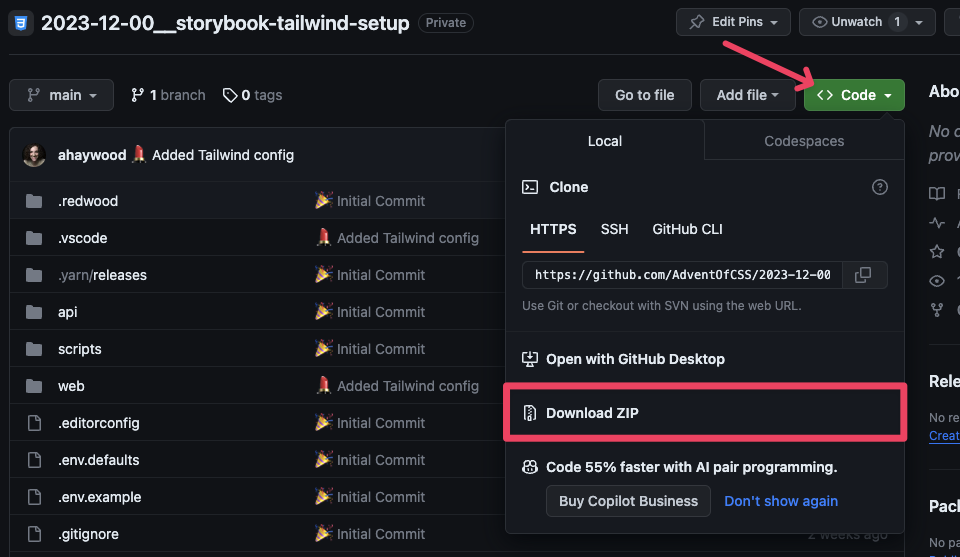
If you’re more comfortable with the Terminal and already have git installed on your computer, then you can copy the URL:
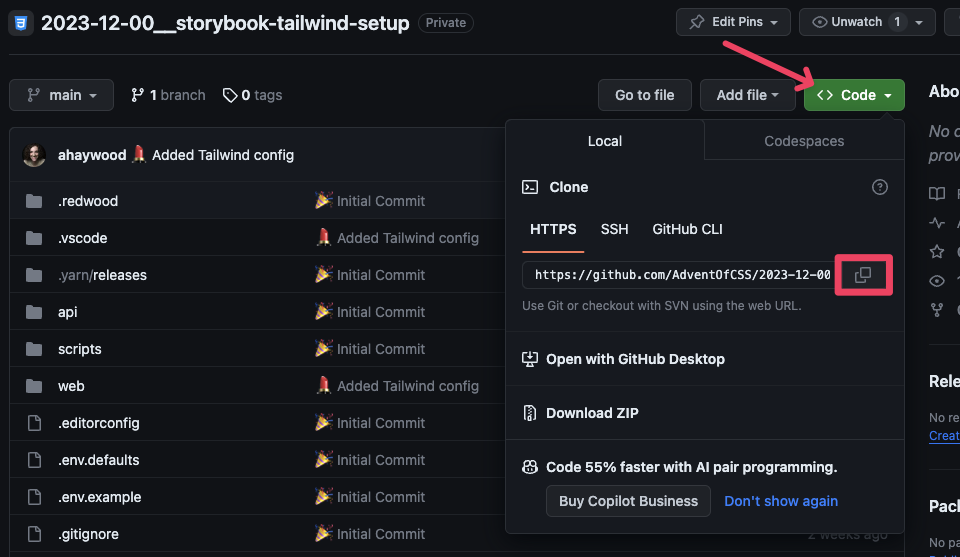
and run git clone <URL>. Then, inside the downloaded project folder, you’ll need to run yarn install . This might take a minute, as it’s downloading all the project dependencies. Now, you can run yarn rw storybook and you’re off to the races! 🏃♀️
If you’re new to GitHub…
Our use of GitHub will be fairly limited. It’s just a way to deliver code to you! But, if you want to dig in and learn more, I have an series on YouTube on working with Git. I recorded it several years ago, but its evergreen. All the content is still useful and relevant.
Part 1: What is git? Why use it? How to install it - https://youtu.be/A6bo-NjKtTc
Part 2: How to use git in the Terminal and in a Graphical User Interface, like Tower - https://youtu.be/cX-2k3dt11c
Part 3: Fixing Bad Commits - https://youtu.be/d--34g7u3cM
Part 4: Branching - https://youtu.be/8Gno6JUOYHk
Part 5: How to Resolve Merge Conflicts - https://youtu.be/Lz5fWjnemSA
Part 6: Writing and Approving Pull Requests in GitHub - https://youtu.be/1XrP6POUPD0
Part 7: Best Practices for Teams - https://youtu.be/Hd_BMpn4sBA
Part 8: What is Tracking? - https://youtu.be/CKKzLJv5J2Y
Part 9: gitignore Tutorial - https://youtu.be/lAIZsCHQBpE
Part 10: My Favorite git Trick: gitmoji - https://youtu.be/-0o53Ys1HIs
Part 11: Oh my Zsh! Tutorial - git Customizations and Shortcuts - https://youtu.be/DcoNNVM_GlQ
Part 12: git for Beginners: Using SSH Keys with GitHub - https://youtu.be/2dA1dfkS79o