Challenge #1
Welcome! This is Day 1 of the Advent of JavaScript! WOO HOO!
If you haven’t already, I’d encourage you to look around Podia. I’ve included several resources for working getting started, working with GitHub, Storybook, Figma, and Redwood.
Over the next 24 days, we'll be building a full-stack application.
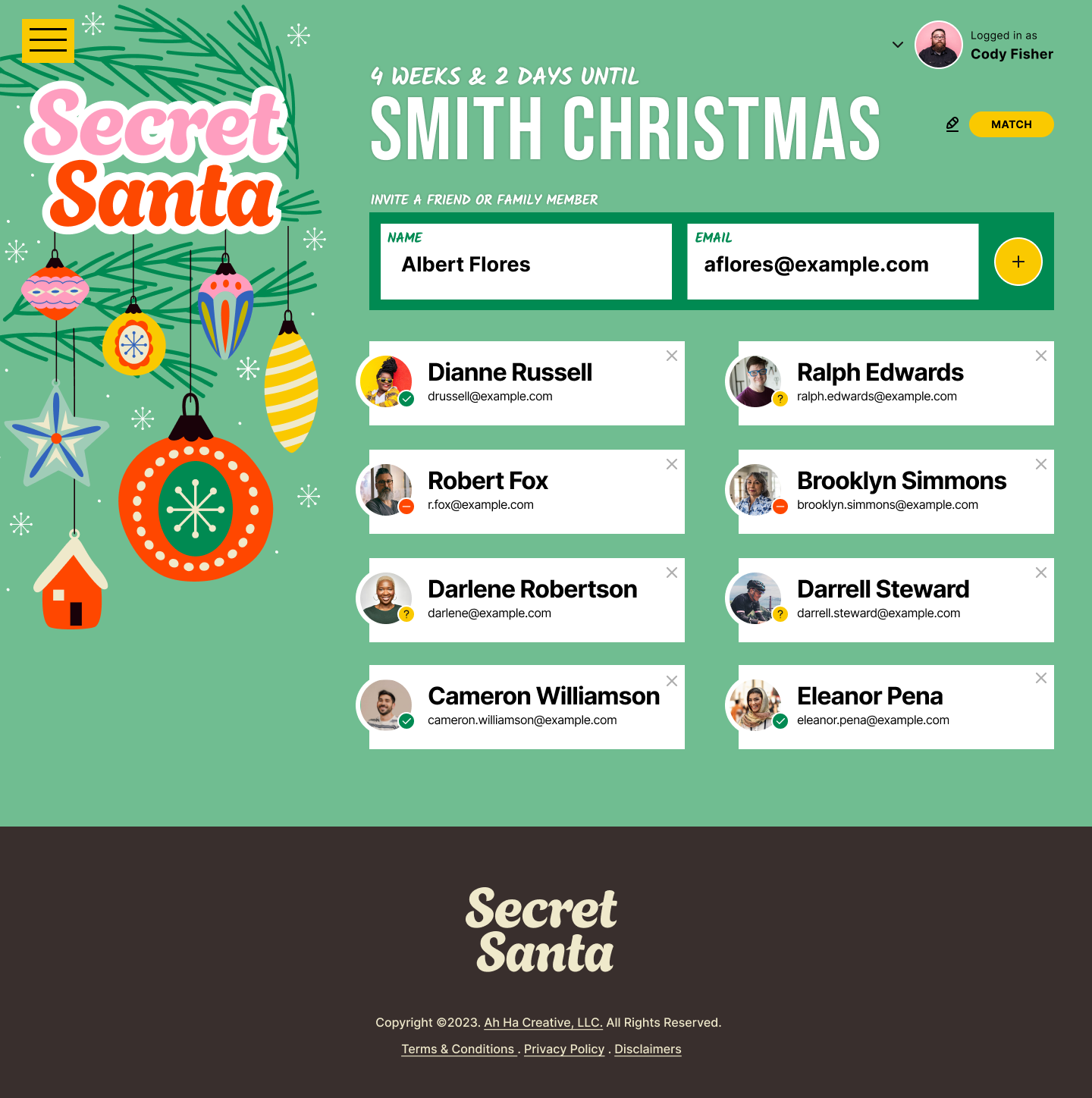
It's a Secret Santa application that will allow users to create an event, invite their friends and family. Once a user has accepted the invitation, they'll be able to add a wish list, making shopping easy. After everyone has RSVPed, the application will match everyone with a Secret Santa.
For today's challenge, we’ll be setting up our Database 🙌
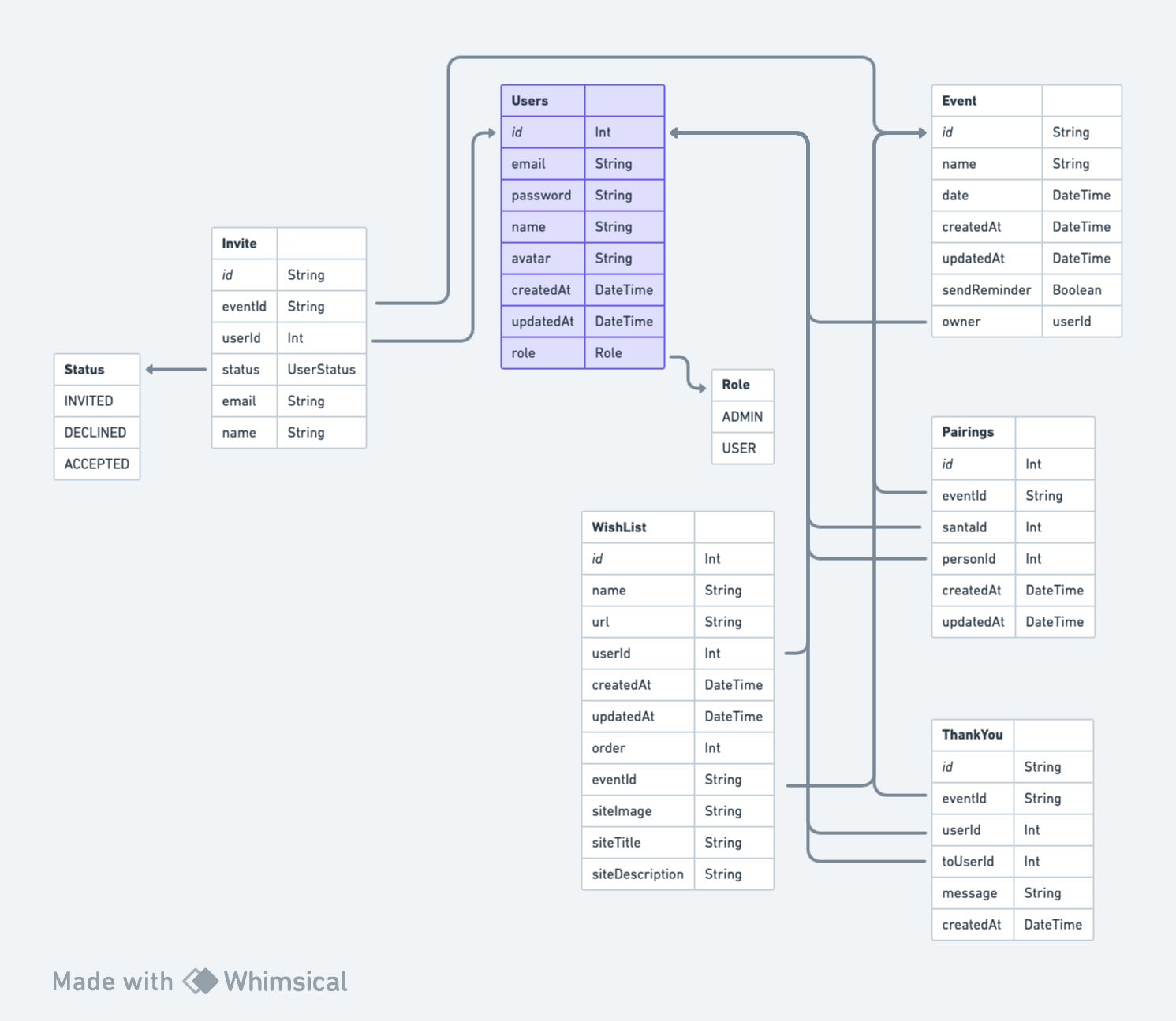
UPDATE: December 11, 2023
The UML diagram pictured above is slightly different than the one used in the challenge. In Challenge #5, I changed the UserStatus table to be called Invite. I also added 2 additional columns (email and name) and added an owner column to the Event table.
You can use the same diagram used within the Solution content and make the changes, when you get to #5 OR you can work from the updated diagram now. Your choice.
Brief
In today’s challenge, we’ll set up our database and all of our data models.
If you’re using RedwoodJS, like I am, use this repo as a starting point. It includes a library of frontend components so that you don't have to worry about CSS and and can focus on JavaScript as much as possible.
Getting Started
To get started, download the UML diagram. This outlines all the database tables and their relationships. If you're new to backend development, a UML diagram is simply a picture of what the database and all it's tables look like. You can almost think of it like a glorified Excel Spreadsheet. The arrows show how different pieces of data are related.
Take a look around. Look at the project's Figma file to see exactly what we’ll be building and how the data will flow through the application. If you don't have a Figma account, don't worry, you can set one up for free. If you’re not familiar with Figma, I’ve recorded some help videos and posted them on Podia, within the Appendix section
You’re more than welcome to use any framework you’d like. However, the solutions I’m providing are within Redwood. If you want to follow along, you can use this repo as a starting point. — More details on how to use this code and Redwood can be found in the Appendix section of Podia.
Happy coding!
Once you're finished, share your work using #adventofjs
Taking your Project to the Next Level
If you want to make this extra challenging, don’t use the data model I provided. Try mapping everything out yourself.
FAQs
-
Can I use libraries / frameworks on these projects?
Of course! We're working with RedwoodJS, but you can use whatever tools and frameworks you'd like.
-
Oh no! I'm stuck!
Check out the RedwoodJS Discord. We’ve set up a specific channel: Advent Challenge.
Join Maker Hour on Wednesday. I’ll be there!
-
Can I use this project in my portfolio?
Sure! But, be honest about the work that you did
Merry Coding,
Amy
Special Thanks to Our Sponsor
Thanks to the generosity of our sponsor, RedwoodJS, I’m able to offer all the content for free.