Working with GitHub

Working with GitHub

Advent of CSS on GitHub

GitHub is a perfect place for storing your code, whether you’re working by yourself, with a team, or sharing code (like I am) with others.

The simplest way to get code out of GitHub and onto your machine is to download a zip.
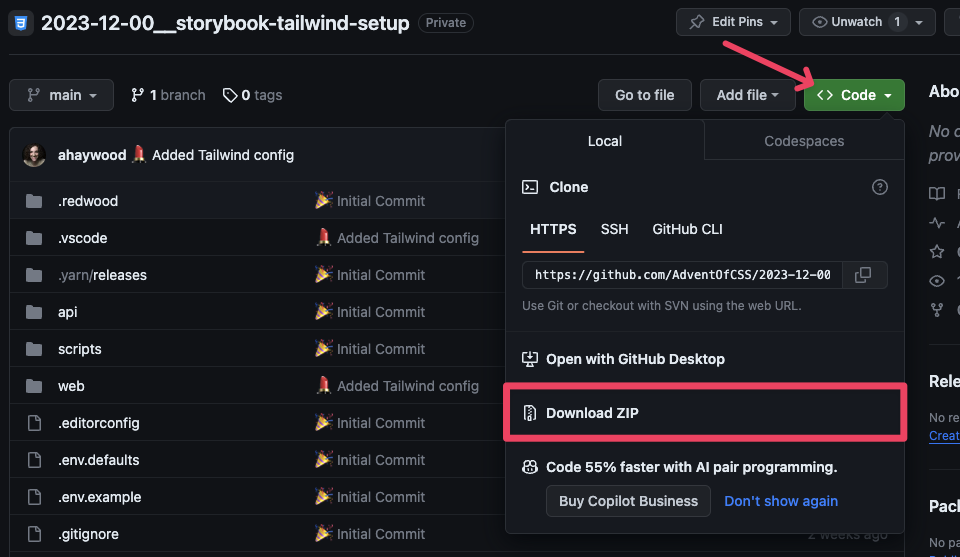
Downloading a Zip from GitHub

If you’re more comfortable with the Terminal and already have git installed on your computer, then you can copy the URL:
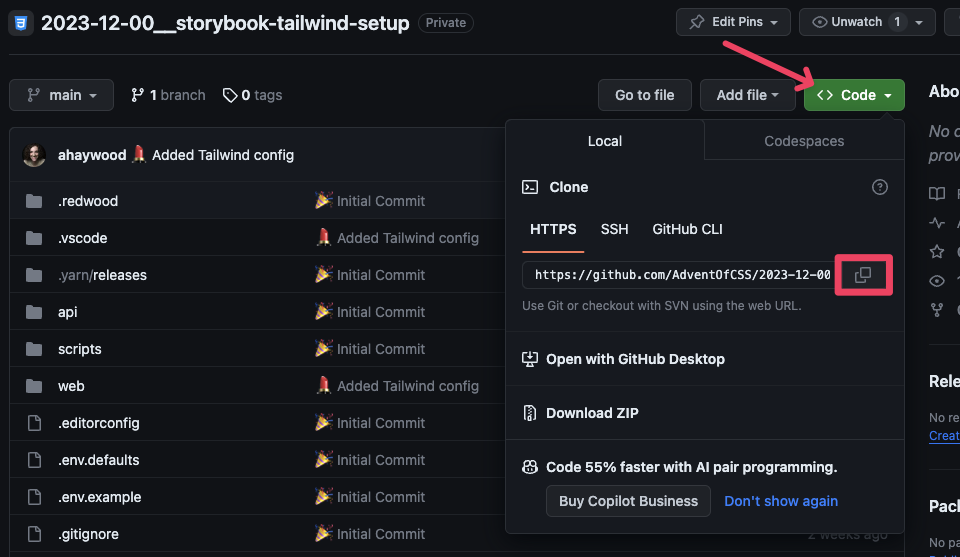
Getting a URL to clone from GitHub

and run git clone <URL>. Then, inside the downloaded project folder, you’ll need to run yarn install . This might take a minute, as it’s downloading all the project dependencies. Now, you can run yarn rw storybook and you’re off to the races! 🏃‍♀️

If you’re new to GitHub…

Our use of GitHub will be fairly limited. It’s just a way to deliver code to you! But, if you want to dig in and learn more, I have an series on YouTube on working with Git. I recorded it several years ago, but its evergreen. All the content is still useful and relevant.

  • Part 1: What is git? Why use it? How to install it - https://youtu.be/A6bo-NjKtTc

  • Part 2: How to use git in the Terminal and in a Graphical User Interface, like Tower - https://youtu.be/cX-2k3dt11c

  • Part 3: Fixing Bad Commits - https://youtu.be/d--34g7u3cM

  • Part 4: Branching - https://youtu.be/8Gno6JUOYHk

  • Part 5: How to Resolve Merge Conflicts - https://youtu.be/Lz5fWjnemSA

  • Part 6: Writing and Approving Pull Requests in GitHub - https://youtu.be/1XrP6POUPD0

  • Part 7: Best Practices for Teams - https://youtu.be/Hd_BMpn4sBA

  • Part 8: What is Tracking? - https://youtu.be/CKKzLJv5J2Y

  • Part 9: gitignore Tutorial - https://youtu.be/lAIZsCHQBpE

  • Part 10: My Favorite git Trick: gitmoji - https://youtu.be/-0o53Ys1HIs

  • Part 11: Oh my Zsh! Tutorial - git Customizations and Shortcuts - https://youtu.be/DcoNNVM_GlQ

  • Part 12: git for Beginners: Using SSH Keys with GitHub - https://youtu.be/2dA1dfkS79o

Advent of CSS 2023

Buy nowLearn more

👋 Welcome

  • START HERE!2
  • Setting up your Project2

Challenge #1 - Building An Icon Component

  • Challenge #18
  • Project Files
  • Solution #16

Challenge #2 - Building an Avatar Component

  • Challenge #2
  • Project Files
  • Solution #25

Challenge #3 - Form Fields and CSS Only Validation

  • Challenge #34
  • Project Files
  • Solution #35

Challenge #4 - Show / Hide Password

  • Challenge #4
  • Project Files
  • Solution #4

Challenge #5 - Login Layout

  • Challenge #5
  • Project Files1
  • Solution #5

Challenge #6 - Slide up Footer

  • Challenge #6
  • Project Files
  • Solution #6

Challenge #7 - Hamburger Menu

  • Challenge #7
  • Project Files
  • Solution #7

Challenge #8 - Slide Out Navigation

  • Challenge #8
  • Project Files
  • Solution #8

Challenge #9 - Dropdown Menu

  • Challenge #9
  • Project Files
  • Solution #9

Challenge #10 - Interior Page Layout

  • Challenge #10
  • Project Files
  • Solution #10

Challenge #11 - Custom Checkbox

  • Challenge #11
  • Project Files
  • Solution #111

Challenge #12 - RSVP Pages

  • Challenge #12
  • Project Files
  • Solution #12

Challenge #13: Invite Card

  • Challenge #13
  • Project Files
  • Solution #13

Challenge #14 - Invite Group Form

  • Challenge #14
  • Project Files
  • Solution #14

Challenge #15 - Modal

  • Challenge #15
  • Project Files
  • Solution #15

Challenge #16 - Create your wishlist

  • Challenge #16
  • Project Files
  • Solution #16

Challenge #17 - Slide Out Panel

  • Challenge #17
  • Project Files
  • Solution #17

Challenge #18 - View Your Wish List Layout

  • Challenge #18
  • Project Files3

Challenge #19 - Expanding and Collapsing Accordion

  • Challenge #19
  • Project Files

Challenge #20 - Dashboard Page

  • Challenge #20
  • Project Files1

Challenge #21 - Pairing

  • Challenge #21
  • Project Files

Challenge #22 - Thank You Note

  • Challenge #22
  • Project Files

Challenge #23 - Spinner for the Loading State

  • Challenge #23
  • Project Files

Challenge #24 - Light and Dark Theme Switcher

  • Challenge #24
  • Project Files

Appendix

  • Getting Help and Support
  • Working with GitHub
  • Working with Gitpod2
  • Working with Storybook
  • Working with Redwood
  • Testimonials
  • Want more? Where to go from here?